



What Is a Google Review and How Does the Ecosystem Function?
Customer feedback shapes modern business success across every industry. A Google Review represents public written feedback accompanied by a star rating from one to five stars, which consumers leave on a business listing. These entries appear directly on Google Search results and Google Maps listings. Consumers rely on these star ratings to evaluate local services, retail shops, medical practices, and restaurants .
First of all, the ecosystem relies on authentic consumer experiences. When a customer interacts with a company, that customer can publish a public rating. Additionally, the review display aggregates individual star scores into an overall average rating. This overall score appears prominently next to the business title. Therefore, potential buyers see the rating immediately when they search for local services online.
The Shift Toward Transparency and Authentic Feedback
Modern shoppers demand complete transparency before they spend money. Research demonstrates that 97% of consumers read online reviews for local businesses before making a purchase decision. On top of that, 93% of consumers make direct buying choices based on the feedback they read online. Customer trust builds gradually over time through consistent service quality.
However, false feedback and manipulated star ratings distort consumer choices. Consumer protection authorities like the Federal Trade Commission impose strict rules against deceptive endorsements. Also, search engines continually update their algorithms to identify fake ratings. Transparency remains the central requirement for sustainable business growth.
Numerical Proof of Consumer Review Influence
Data highlights the immense impact of online feedback on buyer behavior:
- 97% of consumers read online reviews for local business locations before visiting or purchasing.
- 93% of shoppers state that online reviews directly drive their final purchase decisions.
- 83% of buyers read feedback on Google specifically before selecting a service provider.
- 81% of shoppers choose Google over other review platforms when researching local companies.
Why do these figures matter? Because public opinion directly dictates revenue. Simple as that.
Why Google Reviews Are Vital for Business Growth and Revenue
Direct Impact on Business Revenue and Conversion Rates
Online feedback operates as a direct revenue driver for modern companies. Positive star ratings convert passive online search traffic into paying clients.
The Financial Boost Behind Positive Online Ratings
Businesses with strong ratings experience substantial sales growth. Specifically, companies that maintain positive online ratings achieve up to an 18% boost in revenue from Google search results alone.
Additionally, high star ratings increase customer conversion rates on business websites. When prospective clients see hundreds of verified high ratings, purchase hesitation disappears. Plus, high rating averages validate the value of premium pricing.
A Comparison of Google to Yelp, Facebook, and Tripadvisor
Google maintains absolute dominance in the online feedback market. Other review websites attract only a small fraction of overall consumer attention.
Market Share Comparison Across Major Review Websites
Statistical data confirms the overwhelming market share of Google:
- Google Hosts 73% of all online business reviews across the internet.
- Yelp Hosts 6% of total consumer business feedback.
- Facebook Hosts 3% of overall online business feedback.
- Tripadvisor Hosts 3% of global customer review entries.
- 67% of Consumers select Google as their preferred platform for writing customer reviews.
What does this market distribution mean? It means your google reviews profile represents the main pillar of your public reputation. No contest.
How Businesses Build Long-Term Consumer Trust
Consumer confidence relies heavily on active merchant communication. Buyers want to know that a company values customer satisfaction and handles complaints responsibly.
Why Modern Consumers Rely on Customer Feedback Before Buying
Shoppers view recent feedback as objective social proof. Research reveals that 88% of consumers express a preference for businesses that respond to all customer feedback, positive and negative alike. On the contrary, 57% of consumers state that they are unlikely to patronize a business that ignores customer reviews completely.
Therefore, active public engagement builds lasting brand loyalty. Later, potential clients see that the business owner addresses issues directly with care and professionalism.
How Google Reviews Impact Local SEO and Search Rankings
The Mechanics of Google Local 3-Pack and Map Rankings
Local search engine optimization determines which local companies appear at the top of search results. Search algorithms evaluate multiple factors to determine search positions.
Search Relevance, Distance, and Review Signals
First of all, search algorithms calculate relevance, distance, and prominence. Relevance measures how closely a business profile matches the query of the user. Distance evaluates physical proximity to the user. Prominence measures how well-known and well-regarded a business is within its local area.
Similarly, prominence draws heavy signals from public feedback entries. High star ratings and high total review counts signal strong prominence to search engine algorithms. Consequently, search engines display well-rated businesses higher in local map packs.
Key Review Metrics That Drive Local Search Algorithms
Four specific operational metrics directly influence local search engine ranking algorithms:
- Lifetime Review Volume: Total review count matters significantly. A baseline threshold of 100 verified entries helps a business break out of introductory status.
- Monthly Review Velocity: A steady pace of 10 to 20 new entries every month keeps signals fresh.
- Review Recency: Search algorithms penalize businesses that suffer from long review gaps. A gap of 90 days without new feedback lowers search visibility.
- Owner Response Rate: A high response rate of 90% or more within 24 to 48 hours provides a strong local ranking boost.
The result? Better local visibility and higher organic map traffic.
Review Schema and Search Engine Understanding
Structured data markup helps search engines process customer feedback accurately. Review schema code highlights aggregate star scores directly in organic search snippets. Additionally, artificial intelligence search engines analyze review text to extract entity details. On top of that, user keywords inside review text reinforce local relevance signals.
The Major 2026 Google Business Profile Review Policy Updates
What Changed in Early 2026 and Why It Matters
Google implemented massive updates to its Prohibited and Restricted Content policies in early 2026. These revisions target manipulation practices that many commercial firms previously used as standard growth strategies.
Strict AI Enforcement and Automated Review Deletions
Automated artificial intelligence systems now continuously audit Business Profiles. These automated tools detect unnatural submission patterns and remove violating entries without advance notice.
However, many honest business owners unknowingly violate these updated rules. Knowledge of these compliance updates protects earned ratings from sudden deletion.
The Complete Ban on Asking for Staff Name Mentions
For years, automobile dealerships, home service companies, and medical clinics trained employees to ask customers for specific staff name mentions. Management often tied employee performance bonuses directly to review counts that mentioned first and last staff names.
Why Guided Scripts and Staff Bonuses Cause Policy Violations
The updated 2026 policy explicitly forbids merchants from requesting that customers include specific content inside reviews, such as staff member names. When a merchant tells a client what to write, the entry ceases to be a genuine, unguided reflection of customer experience.
Artificial intelligence filters easily detect unnatural name mention frequency. For instance, real consumers rarely write both the first name and the last name of a technician organically. Industry experts like Greg Gifford note that real customer reviews almost never include full formal employee names. Consequently, automated systems flag and delete scripted entries containing full staff names.
The Ban on On-Site Review Kiosks and Shared Tablets
Many retail stores, dental clinics, and automotive shops previously passed shared iPads or tablets to clients before those clients exited the premises.
Why Coercive In-Person Requests and Single IP Activity Trigger Removal
The 2026 policy explicitly prohibits merchants from requiring or pressuring customers to write reviews while still located on physical business premises. When a merchant asks a client to submit feedback while standing in the lobby, that request creates social pressure and social awkwardness.
Furthermore, multiple submissions coming from a single shared device or single internet protocol address trigger automated spam filters. As a result, in-store review kiosks and shared front-desk tablets are now completely illegal under platform policy.
Review Gating Restrictions and Sentiment Screening
Review gating refers to the practice of screening customers privately before deciding where to route them.
Why Routing Negative Feedback Privately Violates Policy
In a gated setup, an automated message asks the buyer: “Did you enjoy your service today?”. If the client selects a positive score, the software routes the buyer to Google. On the contrary, if the client selects a low score, the software directs the buyer to an internal private feedback form.
Google strictly prohibits review gating. Platform rules require that every client receives the exact same opportunity to post public feedback, regardless of satisfaction levels. In-funnel customer filtering distorts the true average rating of a business location. Automated systems detect gated collection funnels and remove all reviews gathered through gated channels.
Strict Penalties for Incentivized Reviews and FTC Enforcement
Gifts or compensation in exchange for customer feedback violate both search platform policies and federal law.
Federal Trade Commission 16 CFR Part 465 Final Rule Regulations
The Federal Trade Commission issued its Final Rule under 16 CFR Part 465 regarding consumer reviews and testimonials. This federal trade regulation carries major legal consequences:
- Prohibition of Fake Reviews: Fake reviews, whether created, bought, or sold, are strictly illegal under federal law.
- Prohibition of Conditioned Incentives: Discounts or gift cards in exchange for positive reviews are strictly prohibited.
- Prohibition of Negative Incentives: Refunds or gifts to induce a customer to delete or revise a negative review violate federal law.
- Severe Civil Penalties: Federal courts can impose significant civil penalties per violation against non-compliant businesses.
Summary of 2026 Policy Compliance Rules:
| Practice Type | Policy Status in 2026 | Legal Risk & Enforcement |
| Asking for Staff Name Mentions | Explicitly Forbidden | Automated Review Deletions |
| On-Site Kiosks / Shared Tablets | Explicitly Forbidden | Spam Filter Review Removal |
| Review Gating (Pre-screening) | Strictly Prohibited | Profile Warning or Suspension |
| Incentivized Feedback (Discounts/Perks) | Strictly Prohibited | FTC Civil Penalties & Review Removal |
| Generalized Equal Solicitations | Fully Compliant & Encouraged | High Profile Visibility & Trust |
How Individual Users and Business Owners Find Their Reviews
How Business Owners Access the Google Business Profile Dashboard
Business owners can find customer feedback through simple navigation.
Desktop Management via Google Search and Google Maps
First of all, sign into the verified Google account that owns the business profile. Later, type the business name directly into Google Search or Google Maps. The business management panel loads automatically on the screen.
Click on the review count link situated under the star rating average. The full feedback window expands. From this dashboard, owners can read entries, filter by rating, and publish owner responses.
Mobile Access via Google Maps App and Push Notifications
Mobile access allows business managers to monitor feedback while away from desktop computers. Open the Google Maps mobile application while signed into the owner account. Search for the company name and tap the business listing.
Tap the “See all reviews” button to display every entry. Additionally, managers can enable email alerts and push notifications in profile settings. Therefore, alerts fire the exact moment a new rating posts.
How Individual Customers View Their Personal Review History
Individual consumers often search for google reviews by me when they want to locate, edit, or delete feedback entries that they wrote in the past.
How to Navigate Google Maps Contributions on Mobile and Desktop
Consumers can access their complete submission archive through Google Maps. On a desktop browser, open Google Maps and click the main menu icon. Select the option labeled “Your contributions” . Click the “Reviews“ tab to display every review written from that account.
Similarly, on mobile devices, tap the profile avatar in the top right corner of the Google Maps app. Select “Your profile” and scroll down to view past contributions. Users can tap the three-dot icon next to any entry to select “Edit review” or “Delete review” . Deletion takes effect immediately across search results.
How to Use the Google My Activity Archive
Additionally, users can view a chronological log of all past ratings through account archives. Visit myactivity.google.com in any web browser. Filter the account activity timeline specifically for Google Maps entries. The system displays every past entry alongside exact timestamps and location details.
How Customers Without a Gmail Account Can Post Reviews
Many prospective reviewers assume that a Gmail email address is required to post customer feedback. However, this assumption is incorrect.
Step-by-Step Process to Create a Google Account with Existing Email
A Gmail account is not required, though a Google account is mandatory. Customers can create a Google account using any existing corporate or personal non-Gmail email address:
- Navigate to the official Google account sign-in page at accounts.google.com.
- Click the “Create account” option and choose “For my personal use” .
- Enter basic personal details like name and date of birth.
- Click the link option labeled “Use your current email address” instead of creating a new Gmail address.
- Type the existing non-Gmail email address (such as Yahoo, Outlook, or corporate domain emails).
- Check the inbox of that existing email account for a verification security code.
- Enter the verification code on the screen and complete profile setup.
Once verified, the user can post google maps reviews freely using their existing non-Gmail email address.
How Google Reviews Work Behind the Scenes (Technical & API Integration)
Google Cloud Platform and Google Maps JavaScript API
Developers can connect website platforms directly to Google review data using official Application Programming Interfaces.
First Step: Setup of Billing, Places API, and API Keys
First of all, create a developer project inside the Google Cloud Platform Console. Next, establish a billing account. Google provides developer credits to test application calls.
Later, open the API Library inside the console dashboard. Locate and enable the Google Maps JavaScript API or the Places API.
Generate a unique API key under the credentials menu. Apply HTTP referrer restrictions to the API key. This security restriction prevents unauthorized websites from stealing developer quota limits.
How Developers Fetch Location Data and Place IDs
To request feedback data programmatically, developers must identify the unique Place ID of the target business location.
How to Use the Atmosphere Category to Retrieve JSON Review Data
Navigate to the developer Place ID lookup tool and search for the business address. Copy the generated alphanumeric string.
Developers execute an Application Programming Interface request using structured JavaScript code:
var axios = require(‘axios’);
var config = {
method: ‘get’,
url: ‘https://maps.googleapis.com/maps/api/place/details/json?place_id=YOUR_PLACE_ID&fields=name,reviews,user_ratings_total&key=YOUR_API_KEY’,
headers: { }
};
axios(config)
.then(function (response) {
console.log(JSON.stringify(response.data));
})
.catch(function (error) {
console.log(error);
});
The system returns a JSON array response containing up to five top reviews, overall average star rating, and total rating counts. Field requests fall under the Atmosphere billing tier.
Why Automated Spam Filters Hide or Remove Reviews
Occasionally, authentic reviews vanish unexpectedly. Business owners often panic when legitimate positive ratings disappear.
Account Credibility, Suspicious Activity, and Recovery Windows
Automated spam protection algorithms continuously evaluate user account history. Reviews may be hidden temporarily due to the following triggers:
- Brand New User Accounts: Accounts without prior browsing history face temporary screening holds.
- IP Address Spikes: Multiple entries originating from a single internet protocol address trigger immediate automated removal.
- Suspicious Posting Velocity: Sudden bursts of dozens of reviews in a short window flag algorithmic spam alerts.
- Prohibited Content Violations: Entries containing URLs, profanity, or phone numbers face automatic removal.
Gradually, once automated systems verify user account credibility, legitimate held entries often reappear on public business profiles.
Master Strategy for Compliant Review Generation in 2026
Ethical Request Workflows Across SMS and Email
A systematic collection process enables businesses to build a massive base of authentic customer reviews.
Universal Solicitation Without Rating Specification or Incentives
First of all, businesses must send review invitations to every single customer. Never pre-screen recipients based on assumed satisfaction.
Additionally, never specify what rating score the client should leave. Avoid phrases like: “Leave us a five-star review!” . Instead, use neutral invitation language: “Please share your honest feedback regarding your recent experience with us.” . Plus, never attach discounts or gift offers to the request.
How to Use Physical QR Codes and Receipts Effectively
In-store collateral provides a seamless way to invite customer feedback without violating on-premises coercion rules.
How to Convert In-Store Foot Traffic Into Verified Online Reviews
Print clear Quick Response codes on physical counter signs, business cards, or printed sales receipts. A customer scans the code using a personal smartphone camera. The phone opens the business review page directly on the personal mobile browser of the customer.
Because the customer submits feedback on a personal device through personal cellular data, the entry complies fully with location and device policy requirements.
How to Develop a Consistent Post-Purchase Follow-Up Sequence
The timing of outreach influences conversion success rates dramatically.
How to Time Follow-Up Requests Within 24 to 48 Hours
Send automated Short Message Service texts or follow-up emails within 24 to 48 hours after service completion. At that time, memories of the experience remain fresh in the mind of the consumer.
Limit follow-up outreach to a maximum of two messages: one primary invitation and one gentle reminder. Excessive messaging frustrates buyers and triggers negative feedback.
Professional Guide to Responding to Customer Reviews
Golden Rules for Handling Negative Feedback
Negative feedback feels frustrating, but public replies offer a powerful marketing opportunity. Future prospective buyers read owner responses to evaluate management maturity and accountability.
How to Respond Within 4 to 24 Hours Without Public Arguments
Execute these core rules when responding to criticism:
- Speed Matters: Publish responses within 4 to 24 hours. Rapid replies demonstrate that management prioritizes client care.
- Avoid Public Debates: Never argue, get defensive, or dispute facts on public message threads.
- Acknowledge and Apologize: Validate the client feeling and express regret for the dissatisfaction.
- Move Conversations Offline: Provide a direct name, telephone number, and email address for private resolution.
- Maintain Privacy: Never disclose private customer records or personal details in public messages.
Proven Response Templates for Service, Quality, and Pricing Complaints
Professional scripts ensure consistent message quality across all company representatives.
Template 1: General Negative Experience Complaint
“Hi @CustomerName, thank you for sharing your feedback with us. I am sorry to hear that your experience did not meet your expectations, as that is not the standard we strive to maintain. I would like to learn more about what happened and resolve this for you. Please contact me directly at @OwnerPhone or @OwnerEmail so we can discuss this privately. Sincerely, @ManagerName, General Manager.”
Template 2: Service Quality Complaint
“Hi @CustomerName, I appreciate your honest feedback regarding your recent visit. We take service quality seriously, and I am disappointed that we fell short in your case. I have reviewed the details of your visit with our team. Please reach out to me at @OwnerPhone or @OwnerEmail so I can address this personally. Best regards, @ManagerName, Operations Director.”
Template 3: Disagreements Over Price and Value
“Hi @CustomerName, thank you for taking the time to write to us. I understand that pricing is an important factor, and I am sorry if we did not communicate our service value clearly before work began. We strive for total cost transparency. Please contact me at @OwnerEmail so we can discuss your bill directly. Respectfully, @ManagerName, Owner.”
How to Handle Positive Feedback to Increase Customer Loyalty
A polite response to happy clients reinforces customer retention and boosts brand affinity.
How to Craft Specific Two-to-Four Sentence Owner Responses
Keep positive replies concise, warm, and personal. Express specific gratitude for items or services mentioned in the text of the review.
For example, write: “Thank you for the wonderful review, @SarahM! We are thrilled that @TechnicianMike repaired your air conditioning unit so quickly. We look forward to serving you again next season!”. Personal responses show that a real human reads every submission.
When and How to Report Inappropriate or Fake Reviews
Not every negative review is legitimate. Platform policies allow merchants to request the removal of violating entries.
How to Use the Reviews Management Tool and One-Time Appeals
Merchants can report entries that contain spam, profanity, harassment, hate speech, or competitor conflicts of interest.
- Log into your Business Profile dashboard.
- Click “Read reviews” and locate the violating entry.
- Click the three-dot menu icon and select “Report review”.
- Choose the explicit policy violation reason (such as “Spam” or ***”Profanity”***) and submit.
Google evaluates flagged entries within 5 to 10 business days. If Google denies the initial removal request, open the official Google Reviews Management Tool. Select the option to submit a one-time appeal for up to 10 flagged reviews. Provide supporting evidence demonstrating the policy violation.
Overview of Customer Review Management Software
How Dedicated Platforms Centralize Customer Feedback
Manual feedback management across dozens of platforms becomes difficult as companies scale. Dedicated software platforms centralize monitoring, alerts, and replies inside a single dashboard.
Features of Up Review, Birdeye, Podium, and Other Major Tools
- Up Review: Pro Pack is a SaaS solution for review generation, AI replies, QR codes, and CRM marketing automation, priced from €89 per month.
- Birdeye: Enterprise platform tailored for large multi-location networks, priced between $299 and $449 per site monthly.
- Podium: SMS-based interaction platform specializing in text-based review requests and lead messaging, priced from $399 monthly.
- ReviewTrackers: Analytics-focused monitoring tool providing sentiment tracking across 120+ platforms, priced from $15 per site monthly.
- Grade.us: White-label review management system designed for marketing agencies, priced from $25 per seat monthly.
How Embedded Review Widgets Boost Website Social Proof
Live review widgets on business websites convert visitors into buyers.
How to Filter and Present Authentic Testimonials
Tools like WP Social Ninja, Elfsight, and TrueReview allow site owners to display Google ratings directly on landing pages. Embedded carousels, grids, and floating badges showcase real verified feedback.
Additionally, site managers can apply filters to hide non-relevant entries while maintaining complete authenticity. Embedded widgets build consumer trust right at the final point of purchase.
FAQ’s
What Are Google Reviews and Why Do They Matter?
Google Reviews represent public star ratings and written evaluations submitted by consumers on Google Business Profiles. They matter because 97% of consumers read online reviews before choosing local companies. High star scores build instant consumer trust, increase search rankings, and boost business revenue by up to 18%.
How Do Google Reviews Help Local Businesses?
Google Reviews improve local brand visibility, drive phone calls, and increase foot traffic, and that brings in more qualified leads. Search engine algorithms utilize review scores, total counts, and review recency as key ranking signals. Well-rated companies rank higher in local search map packs, and this brings in more qualified leads.
How Can I Get More Google Reviews for My Business?
Send neutral, un-gated review requests via SMS or email to every customer within 24 to 48 hours of service completion. Place neutral QR codes on receipts and counter signs. Never offer discounts or gifts for reviews, as incentives violate FTC regulations and platform policies.
How Do Google Reviews Affect Customer Trust?
Consumers view recent online reviews as trustworthy social proof. Research shows that 88% of buyers prefer companies that actively respond to all customer feedback. Professional owner responses demonstrate accountability and prove that management values customer satisfaction.
How Long Does It Take for Google Reviews to Appear?
Most authentic customer reviews are posted publicly within a few minutes. However, reviews submitted by new accounts or reviews containing flagged keywords may undergo automated screening holds lasting several hours or days. Once verified, legitimate entries are published to the business profile.
Can Businesses Respond to Google Reviews?
Yes, verified profile owners can respond to every public review directly through Google Search or Google Maps. Polite responses published within 24 hours improve customer retention and strengthen local search engine ranking authority.
Can You Edit or Delete Google Reviews?
Individual reviewers can edit or delete their own reviews at any time through the “Your contributions” tab in Google Maps. Business owners cannot delete negative reviews directly. However, merchants can report policy-violating entries to Google for removal.
Why Are Google Reviews Important for Local SEO?
Google Reviews provide strong prominence and relevance signals to local search algorithms. Higher review counts, fresh review velocity, and high star averages directly elevate a company into the prominent local search 3-pack map results.
Concluding Words
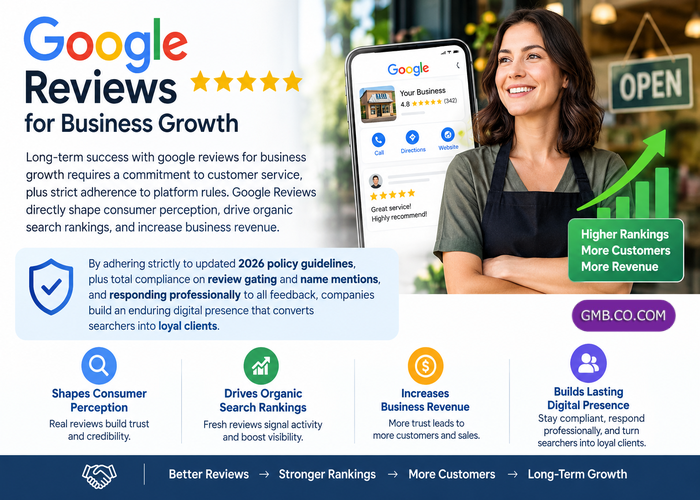
Long-term success with google reviews for business growth requires a commitment to customer service, plus strict adherence to platform rules. Google Reviews directly shape consumer perception, drive organic search rankings, and increase business revenue.
By adhering strictly to updated 2026 policy guidelines, plus total compliance on review gating and name mentions, and responding professionally to all feedback, companies build an enduring digital presence that converts searchers into loyal clients.